
Lunith Commerce OS
Get off the floor. Run your business from one OS.
A starting operating system for a small business that sells: your products, digital or physical, the channels you sell through and their fees, what each sale kept, and a weekly review.
One-time · Instant access · Built in Notion
Manual entry, no live sync, no ranking data. Built for a desktop screen; a free Notion account is enough.
What keeps a small business on the floor
- The numbers live in scattered sheets and platform dashboards, and the sheet meant to join them up is always a week behind.
- Every channel takes its fees its own way, so profit is gross minus a guess.
- Nothing sets a time to look back at the week, so what comes next is decided from memory.
This OS is the floor plan
You still type the numbers in. The arithmetic is done for you.
See real money
Net revenue and revenue per hour on every product, digital or physical; ledger net and the effective fee rate on every channel; and on a physical sale, what it kept after its goods and shipping.
Run the channels
Each channel you sell through keeps its fee rates on its own row, and every sale of every product, digital or physical, is logged against it, in views built for selling rather than generic task boards.
Weekly rhythm
A Weekly Review, four prompts once a week, so "what next?" has a home.
Duplicate. Fill your platforms. Run week one.
The film is the published template, opened in a browser with no Notion account: what you are looking at, how a sale is logged, where the money shows, the listing pipeline, opening a module, and what you can safely change. The same film is in the download, as walkthrough.mp4.
What the film shows, step by step
- Lunith Commerce OS
- The daily routine
- What each channel kept
- This month so far
- Ten databases, six of them the core
- Bring your business in
- Log a sale
- Open an order
- Fees, worked to the cent
- Net is what you kept
- Where the money shows
- Open a channel
- Gross, fees paid, net revenue
- Effective fee rate
- Profit after ads
- The pipeline
- The catalogue
- Open a product
- Stock, for what you ship
- A module: Launches
- Once a week
- What to change safely
- Delete the Example rows and start
Inside the OS
Screens from the published template, showing its example rows. Every number in them was either typed in or worked out from what was typed; nothing syncs.
Start from one clean, simple dashboard
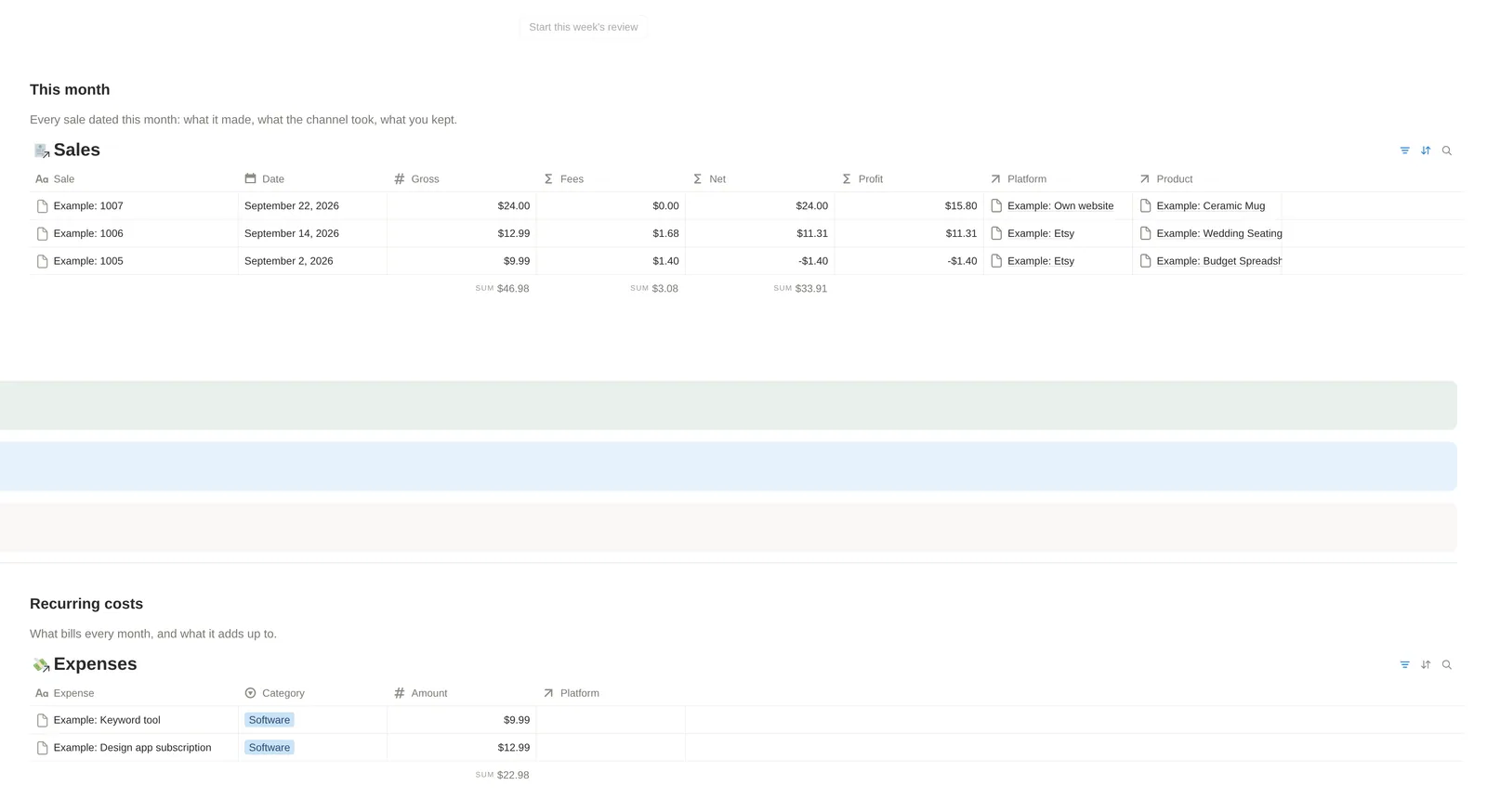
This month and this month's bills, on the same screen
The other half of the dashboard: This month lists only the sales dated this month, with gross, fees, net and what each kept after goods and shipping, and the sums of gross, fees and net along the bottom; Recurring costs lists what bills every month, summed. One button starts this week's review.
Know what each product actually clears
Each product is one row, however many storefronts sell it, with its Kind, digital or physical. Net revenue adds up every sale of it after fees, and Revenue per hour divides that by the hours it took to make: in the example, $46.92 and $7.82 an hour for the seating kit, $5.69 and $0.63 an hour for the spreadsheet.

Know what is on the shelf, and when to reorder
The Stock view lists the physical products only: the count you last made, the level you reorder at, what one unit costs you and how many units have sold. Low stock ticks itself when the count falls to the reorder level; here the example mug has 18 against 10, so it is not ticked. You type the count; no sale takes it down.

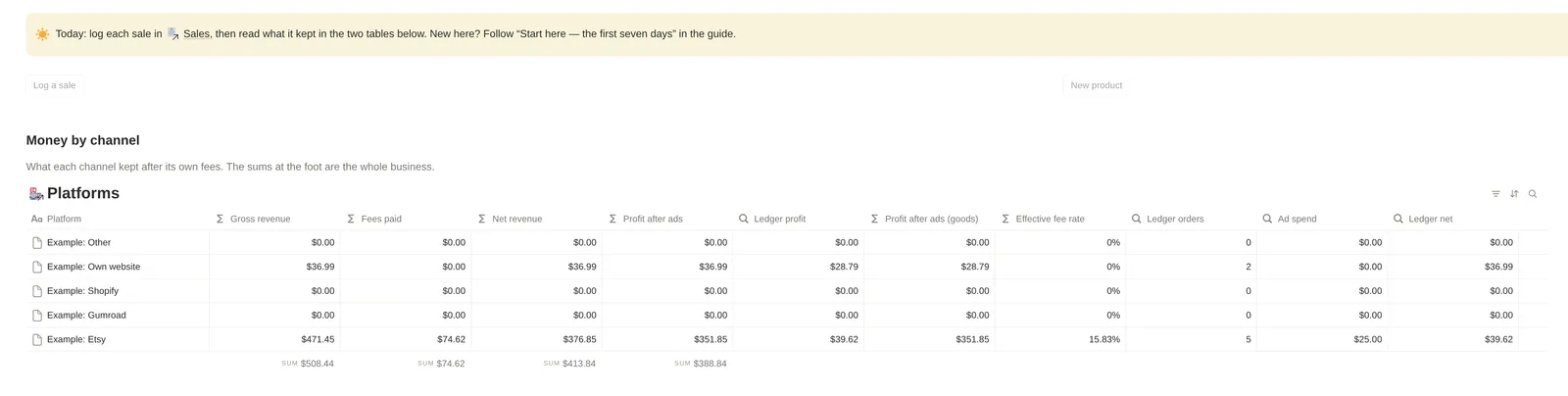
See fees and net by channel without a second spreadsheet
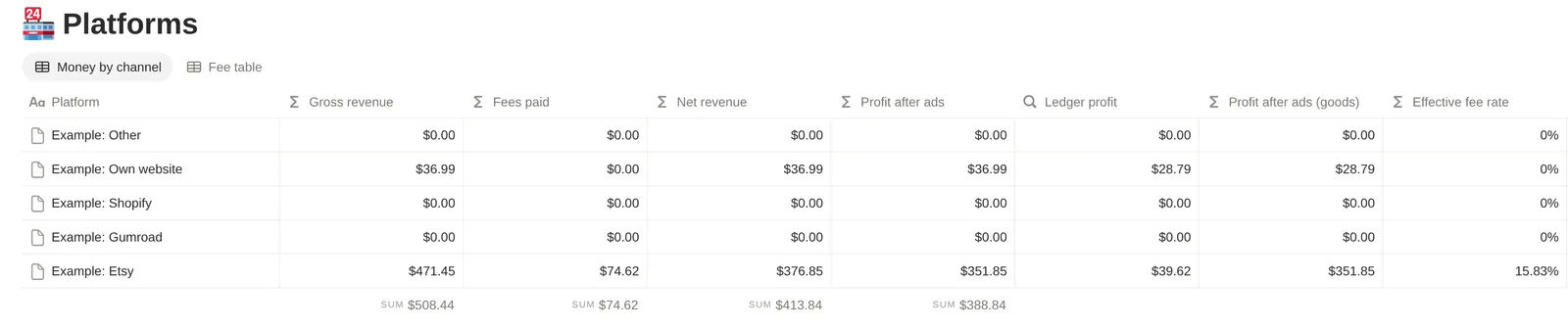
One row per storefront: gross revenue, fees paid, net revenue, profit after ads, the same profit with goods and shipping taken off, and the effective fee rate. On the example Etsy row, at US-seller fees checked on 21 September 2026, $74.62 in fees on $471.45 gross is an effective rate of 15.83%. The sums along the bottom are the whole business.

Ledger net sits next to ad spend and order count: one channel's story
Ledger net adds up what the orders logged one by one kept, Ledger orders counts them, and Ad spend adds up the channel's advertising costs. On the example Etsy row that is $39.62 from 5 orders beside $25 of ad spend; its $376.85 net revenue also counts a month of statement totals typed into Months.

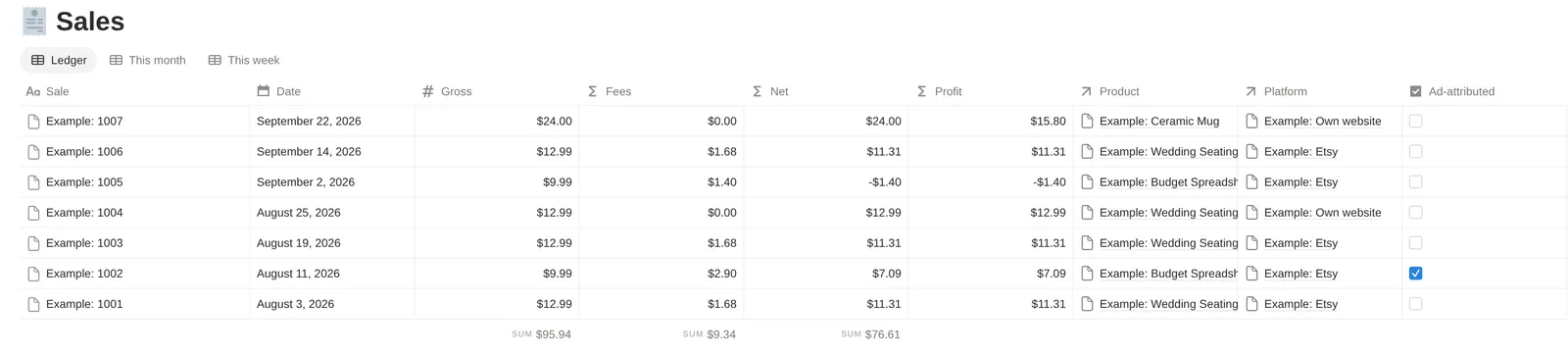
Track orders without losing them in DMs and inboxes
One row per order: pick the product, pick the storefront, type the amount, and tick Ad-attributed when the platform charged its ad fee. Fees and net come from that storefront's own fee row, so example order 1002, $9.99 and ad-attributed, pays $2.90 and nets $7.09. Order 1004 is on a storefront with no fees filled in yet, so it nets its gross. Profit, beside Net, takes a physical order's goods and shipping off: order 1007, two mugs, keeps $15.80.
End the week with a review, not another tab spiral
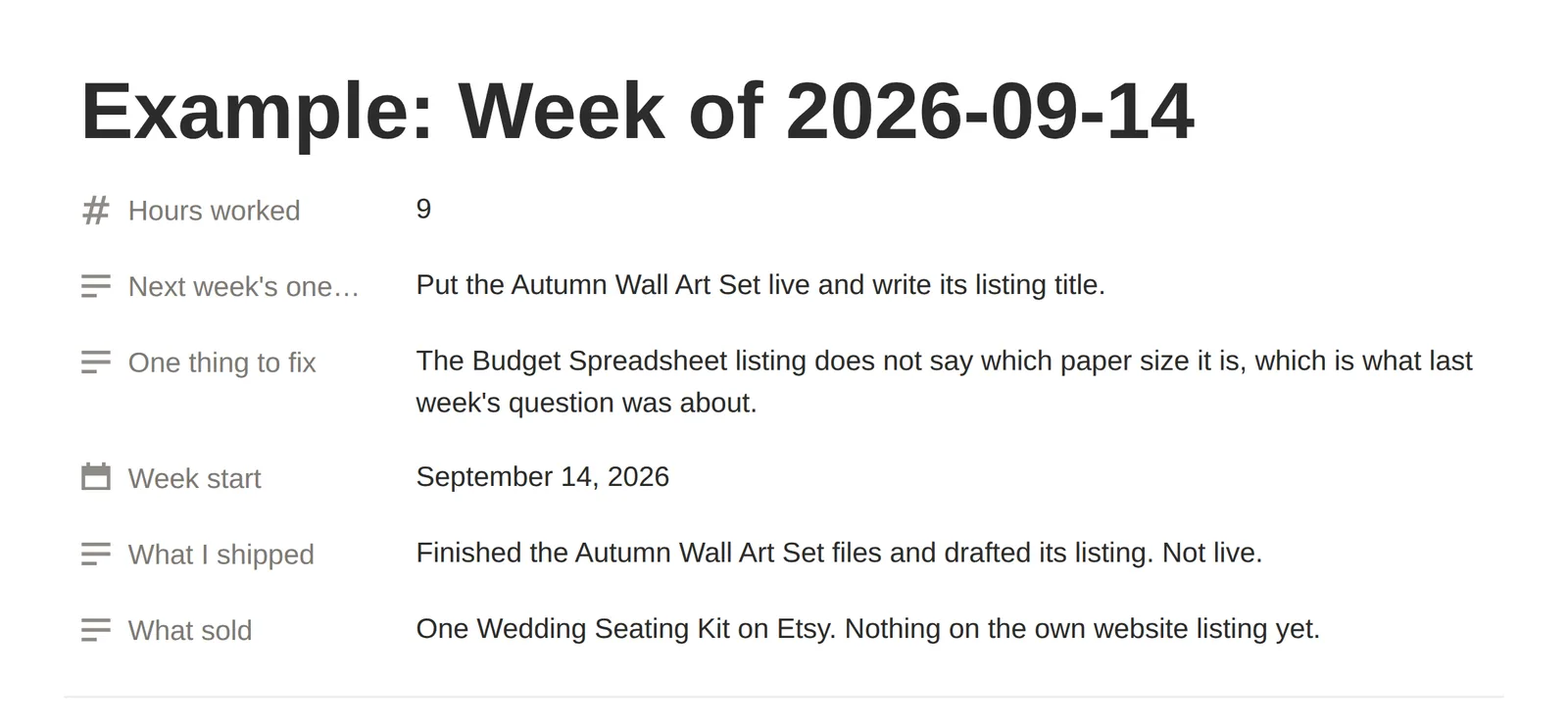
One row a week in Weekly Review: the hours you worked, what sold, what you shipped, one thing to fix and next week's one thing, so the month is written down rather than remembered. This is the example week, filled in.
Catch subscriptions and fixed costs before they eat the month
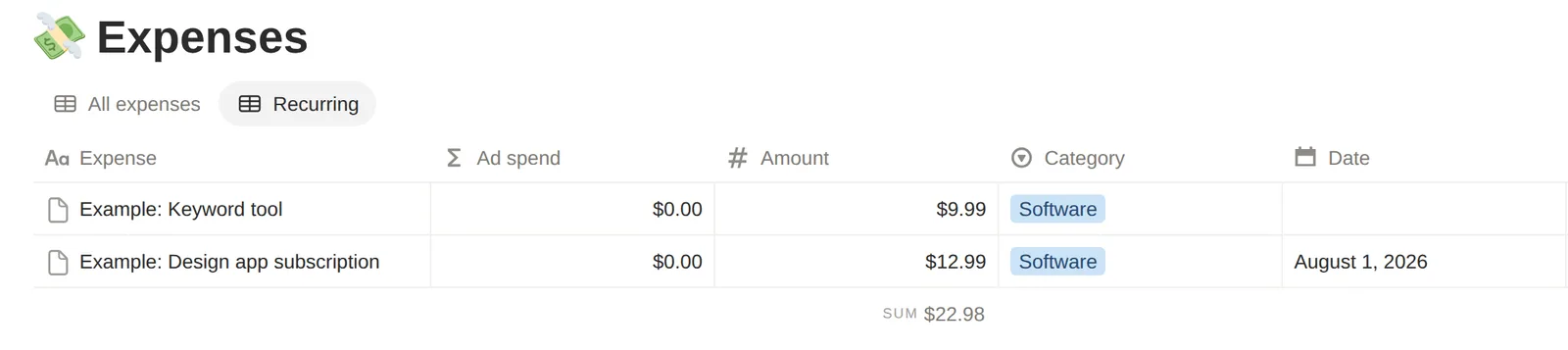
Expenses holds what the business spends, tied to the storefront or product it was for. Tick Recurring on anything that bills every month and the Recurring view lists only those: here, a keyword tool and a design app subscription.
Ten databases, one system
Here, a product is one row, each of its listings is a row of its own, and every sale is linked to both. Each storefront's fee rates sit on its row with the date you checked them, so a sale logged against it works out its own fees and net, and the storefront adds up what it actually kept. You still type the numbers in. The arithmetic is done for you.
The core: set up in the first week
- Platforms
- One row per storefront. The fee table lives here, and so does the money the storefront actually made.
- Products
- The thing you sell, digital or physical, once, however many storefronts it is listed on.
- Listings
- A product on a channel. One row per product per storefront, moving from idea to live.
- Sales
- The ledger, one row per order. Pick the product, pick the channel, type the amount.
- Months
- Monthly totals typed from the platform's own statement, for channels with too many orders to log one by one.
- Expenses
- What the business spends, and which channel or product it was spent on.
Modules: open them when you want them
- Launches
- Each launch, what it is for, and whether the prep actually happened.
- Content
- Every post, pin, video and email, tied to the product or the launch it is for.
- Feedback
- Reviews, questions and file problems, closed out into fixes rather than left in an inbox.
- Weekly Review
- Four prompts, once a week, so the month is written down rather than remembered.
- A fee row per storefront: transaction %, processing % and fixed, per-sale fixed and ad %, with the date you last checked them.
- Products digital or physical: for a physical one, its unit cost, stock on hand and reorder level, with a Low stock flag and a Stock view; on every sale, its units, the shipping charged and what shipping cost, with cost of goods and profit worked out on the row.
- Fees and net worked out on every sale from that storefront's own fee cells, to the cent.
- Months, for a storefront with too many orders to log one at a time: type the statement's totals and the same fees apply.
- Gross revenue, fees paid, net revenue, effective fee rate and profit after ads on every storefront's row, and the same profit with goods and shipping taken off.
- Revenue per hour on every product, from its net revenue and the hours it took to make.
- One listing row per product per storefront, with its price, images, days live and its own status.
- A home page on top: today's routine and three buttons, what each channel kept and this month's sales, then the catalogue, recurring costs, stock to reorder, the modules and a menu of all ten databases.
- Starter rows in every database, each titled Example: something, so one search finds them all when you want them gone.
- In the guide, every database marks which properties are load-bearing and which are safe to rename or delete.
One order, worked through
Example order 1002: $9.99 on the example Etsy row, ad-attributed, at the US-seller fees published when the row was checked on 21 September 2026.
Change one cell on a storefront's fee row and every order on that storefront is worked out again.
| Gross | $9.99 |
|---|---|
| Transaction 6.5% + processing 3% | $0.95 |
| Processing fixed + per-sale fixed | $0.45 |
| Ad fee, 15% on this ad-attributed order | $1.50 |
| Fees | $2.90 |
| Net | $7.09 |
What's included
- The full Notion OS, duplicated into your own workspace from the guide's link: ten linked databases with their views and formulas
- The seven-day Start Here path, one part a day
- Example rows you replace, each titled Example: something, including the example Etsy fee row
- The guide as a PDF, in US Letter and A4, with the duplicate link on page 3 and every database, property and formula explained by name
- A page of three checks to run straight after duplicating, a page on what the template does not do, a support note and a changelog
- Four CSV import templates, for Products, Sales, Listings and Expenses, each headed exactly like its database, with a README for Notion's Merge with CSV
- A README with the three steps to get the template
- walkthrough.mp4, in the download itself: what you are looking at, logging a sale, where the money shows, the listing pipeline, opening a module, and what you can safely change
- Instant delivery once payment clears: a download link on the confirmation page and in your order email
What you need
- A Notion account. The free plan is enough.
- A desktop or laptop screen for setting up and reading the tables.
- A PDF reader, to open the guide.
From checkout to week one
Buy, then download
Checkout is on Stripe's page. The confirmation page and your order email carry the download: the guide as a PDF in US Letter and A4, and a short README.Duplicate it from page 3
Page 3 of the guide carries the duplicate link. Open it while signed in to Notion, click Duplicate, and the whole system copies into your own workspace. A free account is enough.Run the three checks
Straight after duplicating, three example rows should read Net $7.09, Ledger orders 5 and Units sold 4. If any is blank, the duplicate did not carry its relations: duplicate again from the link.Seven days, one part a day
The guide's Start Here path takes you through your fees, your products, your listings, a first week of sales, your expenses, reading the numbers and a first weekly review. It is useful from day four.
Built for
- You run a small business that sells, through one channel or several, and want one place to run it from.
- Your numbers live in spreadsheets and platform dashboards, and you cannot easily see what a sale kept after that channel's fees.
- You want each sale's fees worked out from that channel's own rates.
- You would rather type a sale in than connect an app to your shop.
- You want a starting point to make your own: the guide marks which parts are safe to rename or delete, and the example rows, a small shop with three digital products and one physical one, are there to replace.
Not built for
- Live sync. Nothing updates itself from a marketplace, a shop or a payment account.
- Rankings or keyword research. There is no search-position or keyword data in it; the Keywords field is your own notes.
- Client work. No CRM, invoices, timesheets, proposals or client portals.
- Supplier orders, warehouse locations, shipping labels or product variants. For a physical product it keeps a unit cost, the shipping both ways and a stock count you type, and no more.
- Life planning. No habit grids, no dated personal pages, no decorative dashboard: the home page is the day's routine and the money.
- Phone-first use. It is built for a desktop screen.
What it does not do
Worth reading before you buy.
- Every number is entered by hand: order by order in Sales, or as a monthly total in Months typed from the platform's own statement.
- There is no live connection to any marketplace, shop or payment account. Nothing updates itself from a storefront.
- The import templates bring a history in once. Nothing re-imports or syncs by itself afterwards.
- There is no ranking, search-position or keyword data anywhere in it. The Keywords field on a listing is your own notes.
- Fee figures are yours to keep current. The Etsy row carries the date its figures were checked and a link to Etsy's own fee page, because fees change.
- The fee figures on the Etsy row are US-seller figures. Other countries differ.
- It is built for a desktop screen. A phone works for a glance or a quick entry, not for reading a wide table.
- For a given storefront in a given month, use the Ledger or Months, not both, or that month is counted twice.
- Physical products get a unit cost, units and shipping on each sale, and a stock count with a reorder flag, and no more: no supplier orders, warehouse locations, shipping labels or product variants. Stock on hand is a count you type; no sale takes it down.
- Months rows carry no goods or shipping, so a storefront run through Months counts at its net in profit after goods. Log a physical product's orders in Sales to have its goods and shipping taken off.
- What you get out of it depends on your own shop. Nothing here claims or implies a level of sales, traffic or income.
Questions
Do I need a paid Notion plan?
No. The free Notion plan is enough for everything in it: all ten databases, their relations, formulas and views. You do not need Plus.
How do I get it after I pay?
Straight after payment, the confirmation page shows the download, and the same links arrive by email: a PDF guide in US Letter and A4, and a short README. Page 3 of the guide carries the duplicate link: open it while signed in to Notion, click Duplicate, and the whole system copies into your own workspace.
Is this a marketplace listing pack?
No. Lunith Commerce OS is a Notion OS you own; it works for any channel you track.
Can I get a refund?
Digital products are not refunded. If something you bought does not work, or is not what its page describes, we fix it, and every piece of feedback goes into the LunithLabs software we are building next.
Will you add more products?
Yes: a small shelf of tested tools that work alongside it is planned. This page stays about Lunith Commerce OS.
Is this a freelancer CRM?
No. There are no clients, invoices, timesheets, proposals or client portals in it. It is built around what you sell, the channels you sell it through, and what each sale kept.
Is it a life planner?
No. There are no habit grids, no dated personal pages and no decorative dashboard: the home page is the day's routine and the money. All ten databases are about the selling side of a small business.
I have been selling for years. Will it feel thin?
Judge it on the money layer: a fee row per storefront, fees and net worked out on every order, a monthly-totals route for busy storefronts, and the effective fee rate and profit after ads on each storefront's row. If you already have that somewhere you trust, you do not need this.
I am new to Notion. Will it be too much?
Six databases are the core, and four are modules that stay shut until you open them. The guide's Start Here path takes one part a day for seven days, and day one is a single database: your storefronts and their fees.
Is there a walkthrough video?
Yes. walkthrough.mp4 is in the download itself, not a link to somewhere else. It covers what you are looking at, logging a sale, where the money shows, the listing pipeline, opening a module, and what you can safely change.
Does it work on a phone?
It is built for a desktop screen. A phone is fine for reading a number or logging a sale; the wide tables do not lay out the same way on one.
Does it work for physical products?
Yes. Set a product's Kind to Physical and give it a unit cost, the stock you have on hand and the level you reorder at; on each sale, type the units and the shipping charged and paid. Profit then takes the goods and the shipping off, Low stock ticks when the count falls to the reorder level, and the Stock view and the home page's Stock to reorder list them. It does not raise supplier orders, keep warehouse locations, print shipping labels or handle variants such as sizes, and the stock count is one you type: no sale takes it down.
I only sell through one channel. Is it still useful?
Yes. The fee arithmetic works the same for one channel as for five, and a second channel is one more row when you add it.
Can I bring in the numbers I already have?
Yes, once. Four CSV templates in the download are headed exactly like Products, Sales, Listings and Expenses, and Notion's Merge with CSV brings a filled one in; the guide's Bringing your numbers in page goes through it. After that it is typed in as you go, and nothing syncs.
Does it sync with my shop, or show my search ranking?
No. Every number in it is one you type, order by order or as a monthly total from the platform's own statement. There is no live connection to any marketplace, shop or payment account, no ranking data and no keyword tool. The Keywords field on a listing holds your own notes.
What does logging a sale involve?
A new row in Sales: pick the product, pick the storefront, type the amount, and tick Ad-attributed if the platform charged its ad fee on that order. Fees and net fill themselves in. For a physical product, also type the units and the shipping charged and paid, and the profit after goods and shipping fills itself in too. If a storefront has too many orders for that, type its monthly statement into Months instead.
Are the fees already filled in?
For one example storefront. The Etsy row carries Etsy's published US-seller figures as checked on 21 September 2026, with that date and a link to Etsy's fee page on the row. Fees change and other countries differ, so check them against your own fee page. The Gumroad, Shopify and own-website rows are left for you to fill from each platform's own fee page; until you do, those storefronts net their gross.
What if the duplicate comes across broken?
The guide has a page of three checks for straight after you duplicate: example sale 1002 should read Net $7.09, the example Etsy row Ledger orders 5, and the example Wedding Seating Kit Units sold 4. If any is blank, duplicate again from the link. If that does not fix it, write to us with what you saw, and we will get it working.
Will it be updated?
If it is, the update is additive: new properties, views or modules, never a rename that breaks a formula you rely on, and it is listed in the changelog. You take it by duplicating a fresh copy. The copy you already have is untouched and stays yours.
Is this a subscription?
No. It is a one-time purchase: you pay once, and the copy you duplicate into your workspace is yours to keep. Updates are additive and listed in the guide's changelog; you take one by duplicating a fresh copy from the same link.
Why does it cost more than a simple Notion tracker?
Because of what is in it: ten related databases under one home page, a fee table per storefront, fees and net worked out on every sale, a monthly-totals route, profit after ads per storefront, four modules, CSV import templates, and a guide that explains every database, property and formula by name. If a simpler tracker covers what you need, it is the better buy.
Lunith Commerce OS
Get off the floor. Run your business from one OS.
$59.99USD
Instant access · Notion duplicate · One-time
- Format
- Notion template, delivered as a 37-page PDF guide (US Letter and A4) carrying the duplicate link
- Works with
- A free Notion account and a desktop screen; a phone is for a glance or a quick entry. The guide opens in any PDF reader.
- Delivery
- Delivered by us the moment payment clears: a download link on the confirmation page and in your order email. The guide carries the link to duplicate the template into your own free Notion workspace.
- Licence
- Use it yourself, or inside one business or team; duplicate the template as often as you need; do not share the link, resell the template or pass on copies.
You buy direct from the people who made it. The files are delivered by us, and support is us.
Digital products are not refunded. If something you bought does not work, or is not what its page describes, we fix it, and every piece of feedback goes into the LunithLabs software we are building next. Refunds and fixes
Etsy, Gumroad and Shopify are trademarks of their respective owners. This template is not affiliated with, endorsed by or sponsored by any of them, nor by Notion Labs, Inc.
New tools and articles, by email
When we add a tool or publish an article, you get an email about it. We send one message first to confirm your address, and every email has a one-click unsubscribe.